

[1]:
import numpy as np
import sisl as si
import matplotlib.pyplot as plt

%matplotlib inline
From a geometry to a Hamiltonian
This tutorial sets up tight-binding Hamiltonians from a Geometry. It explains the supercell, shows how to set matrix elements by hand, and then how to set them from the distances between atoms with Hamiltonian.construct.
It assumes that you know how to create a geometry, see the geometry quickstart.
Supercells
A Hamiltonian can only couple orbitals within the supercell of the geometry. The number of supercells, nsc, is a property of the Lattice. It is the number of cells along each lattice vector: the unit cell, plus the neighboring cells on both sides. Thus nsc is always an odd number. A molecule has nsc=[1, 1, 1], i.e. only the unit cell.
[2]:
geometry = si.Geometry([[0, 0, 0]], lattice=si.Lattice(5, nsc=[3, 3, 3]))
print(geometry.nsc)
geometry.set_nsc([3, 1, 5])
print(geometry.nsc)
print("Number of supercells:", geometry.n_s)
[3 3 3]
[3 1 5]
Number of supercells: 15
The final geometry connects to the closest neighboring cell on each side along the first lattice vector (1 + 2 == 3), and to the 2 closest neighboring cells on each side along the third lattice vector (1 + 2 + 2 == 5). Methods that look for neighbors, such as Geometry.close, only find atoms in these supercells.
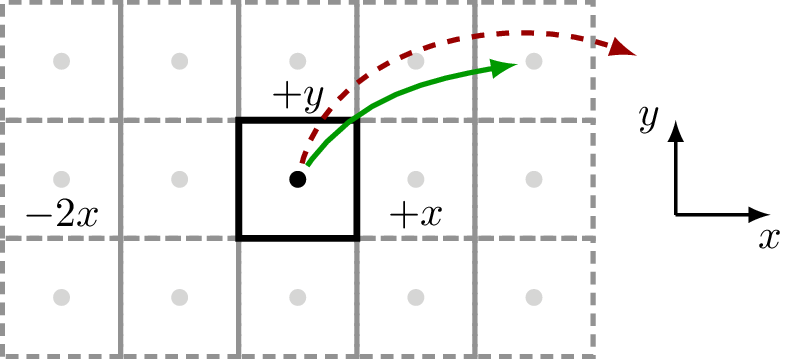
The figure below shows a square 2D lattice with one atom in the unit cell, and nsc=[5, 3, 1]. A coupling within the supercell can be defined (full green arrow). A coupling that reaches farther than the supercell cannot be defined, and is thus always zero (dashed red arrow).
Even though the geometry is 2D, sisl requires the third lattice vector. The non-periodic direction must have nsc equal to 1. Below we create the square lattice with nearest neighbor couplings, i.e. nsc=[3, 3, 1]:
[3]:
square = si.Geometry([[0.5, 0.5, 0]], lattice=si.Lattice([1, 1, 10], nsc=[3, 3, 1]))
square
[3]:
<sisl.Geometry na=1, no=1, nsc=[3 3 1]>
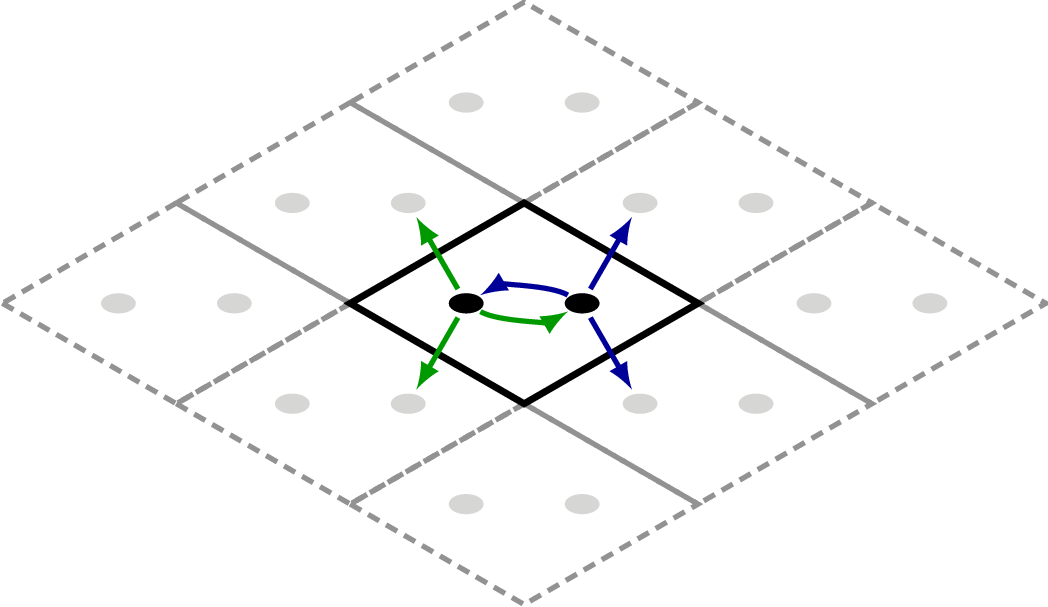
The geometries from sisl.geom have the nsc for nearest neighbor couplings. For graphene, the green and blue arrows show the couplings of the two atoms in the unit cell:
Geometry.find_nsc calculates the smallest nsc for an interaction range. Even the 3rd nearest neighbors of graphene (2.84 Å) are in the closest neighboring cells:
[4]:
graphene = si.geom.graphene()
print(graphene.nsc)
print(graphene.find_nsc(R=2.9))
[3 3 1]
[3 3 1]
Use Geometry.set_nsc to apply the result.
Setting matrix elements by hand
A Hamiltonian takes the orbitals and the lattice from a Geometry. In sisl all Hamiltonians are sparse matrices, and you assign matrix elements as in a regular matrix. A third index selects the supercell of the second orbital, as an offset in units of the lattice vectors.
Below we set the on-site energy of the square lattice to \(-4\) eV and the 4 nearest neighbor couplings to \(1\) eV:
[5]:
H = si.Hamiltonian(square)
H[0, 0] = -4
H[0, 0, (1, 0)] = 1
H[0, 0, (-1, 0)] = 1
H[0, 0, (0, 1)] = 1
H[0, 0, (0, -1)] = 1
H
[5]:
<sisl.physics.Hamiltonian na=1, no=1, nsc=[3 3 1], dim=1, nnz=5, spin=unpolarized>
nnz=5 is the number of non-zero matrix elements. sisl does not enforce that the Hamiltonian is Hermitian. That is the responsibility of the user.
Hamiltonian.eigh calculates the eigenvalues at a \(\mathbf k\) point, in units of the reciprocal lattice vectors. The default is the \(\Gamma\) point:
[6]:
print(H.eigh())
print(H.eigh(k=[0.5, 0.5, 0]))
[0.]
[-8.]
The nearest neighbor model of graphene has zero on-site energy and a hopping parameter of \(-2.7\) eV. Each atom couples to 3 neighbors (see the figure above):
[7]:
H = si.Hamiltonian(graphene)
H[0, 1] = -2.7
H[0, 1, (-1, 0)] = -2.7
H[0, 1, (0, -1)] = -2.7
H[1, 0] = -2.7
H[1, 0, (1, 0)] = -2.7
H[1, 0, (0, 1)] = -2.7
print("Gamma:", H.eigh())
print("K:", H.eigh(k=[2 / 3, 1 / 3, 0]).round(8))
Gamma: [-8.1  8.1]
K: [-0.  0.]
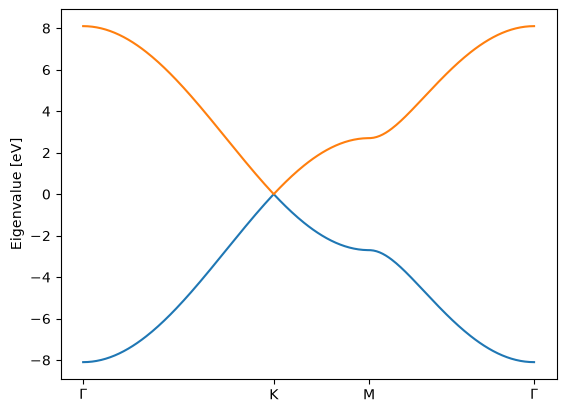
The two bands are at \(\pm 3 \times 2.7\) eV at \(\Gamma\), and touch at the \(K\) point (the Dirac point).
Band structure
BandStructure creates a path through the Brillouin zone. The integer is the total number of \(k\) points on the path. apply.array returns the eigenvalues at all \(k\) points as one array:
[8]:
band = si.BandStructure(
    H,
    [[0, 0, 0], [2 / 3, 1 / 3, 0], [0.5, 0.5, 0], [0, 0, 0]],
    300,
    names=[r"$\Gamma$", "K", "M", r"$\Gamma$"],
)
eigs = band.apply.array.eigh()

plt.plot(band.lineark(), eigs)
plt.xticks(*band.lineartick())
plt.ylabel("Eigenvalue [eV]");
Setting matrix elements from distances
Setting each matrix element by hand does not scale to large geometries. In place, set the elements from the distances between atoms. For this, sisl must know the range of the orbitals. Here the atom is a hydrogen atom with one orbital with a range of 1 Å:
[9]:
hydrogen = si.Atom(1, R=1.0)
square = si.Geometry(
    [[0.5, 0.5, 0]], hydrogen, lattice=si.Lattice([1, 1, 10], nsc=[3, 3, 1])
)
print("Maximum orbital range:", square.maxR())
square.close(0, R=[0.1, 1.1])
Maximum orbital range: 1.0
[9]:
[array([0], dtype=int32), array([2, 4, 5, 7], dtype=int32)]
Geometry.close returns the indices of the atoms within a distance. With a list of radii, the first array is the atoms in the sphere with the first radius (here only the atom itself), and each following array is the atoms in the shell between the radius and the previous radius (here the 4 nearest neighbors). Indices larger than na are atoms in the neighboring cells.
With close we set the parameters for all atoms in a loop. All atoms at the same distance get the same parameter, thus the Hamiltonian is Hermitian:
[10]:
H = si.Hamiltonian(square)
for ia in square:
    idx = square.close(ia, R=[0.1, 1.1])
    H[ia, idx[0]] = -4.0
    H[ia, idx[1]] = 1.0
H
[10]:
<sisl.physics.Hamiltonian na=1, no=1, nsc=[3 3 1], dim=1, nnz=5, spin=unpolarized>
Using construct
The loop above is slow for large geometries, because each call to close searches the full geometry. Hamiltonian.construct does the same, but it searches only small blocks of the geometry at a time. It is the recommended method. For atoms with one orbital, pass the radii and the parameter for each shell:
[11]:
H = si.Hamiltonian(square)
H.construct([[0.1, 1.1], [-4.0, 1.0]])
print(H.eigh(k=[0.5, 0.5, 0]))
[-8.]
For atoms with more than one orbital, pass a function. It gets the Hamiltonian, the atom, the block of atoms to search, and their coordinates:
[12]:
def func(H, ia, atoms, atoms_xyz=None):
    idx = H.geometry.close(ia, R=[0.1, 1.1], atoms=atoms, atoms_xyz=atoms_xyz)
    H[ia, idx[0]] = -4.0
    H[ia, idx[1]] = 1.0


H = si.Hamiltonian(square)
H.construct(func)
print(H.eigh(k=[0.5, 0.5, 0]))
[-8.]
For very large systems, construct the Hamiltonian of a small cell and then use Hamiltonian.tile or Hamiltonian.repeat. This is much faster than construct on the large geometry:
[13]:
H.tile(100, 0).tile(100, 1)
[13]:
<sisl.physics.Hamiltonian na=10000, no=10000, nsc=[3 3 1], dim=1, nnz=50000, spin=unpolarized>
Next steps
The electronic structure walk-through uses these Hamiltonians to calculate eigenstates, density of states, band structures and real-space wavefunctions.