

Selecting atoms with categories
Many sisl methods take a set of atoms: Geometry.sub, Geometry.remove, Geometry.translate, plotting styles and more. Atomic indices work, but they change as soon as the geometry changes. Atom categories select atoms by what they are, where they are, and what surrounds them. The same category works on a small test system and on a large production geometry.
This tutorial introduces categories one step at a time:
one category and its result,
categories where sisl expects atoms,
combining categories,
the atomic environment (neighbors),
the position of atoms,
the short keyword form,
changing a geometry with categories.
[1]:
import numpy as np
import sisl as si
from sisl.geom import AtomCategory, AtomNeighbors, AtomXYZ, AtomZ
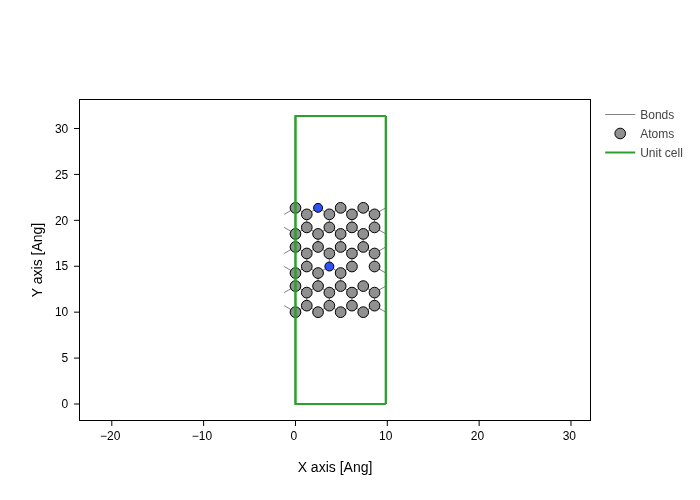
Our test system is a zigzag graphene nanoribbon. It is periodic along the ribbon and has two edges. We replace two carbon atoms with nitrogen, one at an edge and one inside the ribbon, and we remove one atom to make a vacancy.
[2]:
ribbon = si.geom.zgnr(6).tile(4, 0)
ribbon.atoms[[17, 20]] = si.Atom("N", R=1.4342)
ribbon = ribbon.remove(38)
print(ribbon)
Geometry{na: 47, no: 47,
 Atoms{species: 2,
  Atom{C, Z: 6, mass(au): 12.01070, maxR: 1.43420,
   Orbital{R: 1.43420, q0: 0.0}
  }: 45,
  Atom{N, Z: 7, mass(au): 14.00670, maxR: 1.43420,
   Orbital{R: 1.43420, q0: 0.0}
  }: 2,
 },
 maxR: 1.43420,
 Lattice{nsc: [3 1 1],
  origin=[0.0000, 0.0000, 0.0000],
  A=[9.8380, 0.0000, 0.0000],
  B=[0.0000, 31.3600, 0.0000],
  C=[0.0000, 0.0000, 20.0000],
  bc=[Periodic,
      Unknown,
      Unknown]
 }
}
[3]:
ribbon.plot(axes="xy")
/opt/hostedtoolcache/Python/3.14.8/x64/lib/python3.14/site-packages/sisl/viz/processors/xarray.py:208: FutureWarning: Deleting a single level of a MultiIndex is deprecated. Previously, this deleted all levels of a MultiIndex. Please also drop the following variables: {'sc_atom'} to avoid an error in the future.
  new[var] = new[var] * scale
/opt/hostedtoolcache/Python/3.14.8/x64/lib/python3.14/site-packages/plotly/io/_kaleido.py:185: UserWarning: The kopts argument is ignored if using a server.
  img_bytes = kaleido.calc_fig_sync(
1. One category
AtomZ selects atoms by their atomic number. It accepts the number or the symbol. The method mask returns one boolean value per atom: True for the atoms in the category.
[4]:
nitrogen = AtomZ("N")
mask = nitrogen.mask(ribbon)
print(mask)
print("indices:", np.flatnonzero(mask))
[False False False False False False False False False False False False
 False False False False False  True False False  True False False False
 False False False False False False False False False False False False
 False False False False False False False False False False False]
indices: [17 20]
A category does not store the geometry. You can use the same nitrogen category on any geometry.
2. Use a category where sisl expects atoms
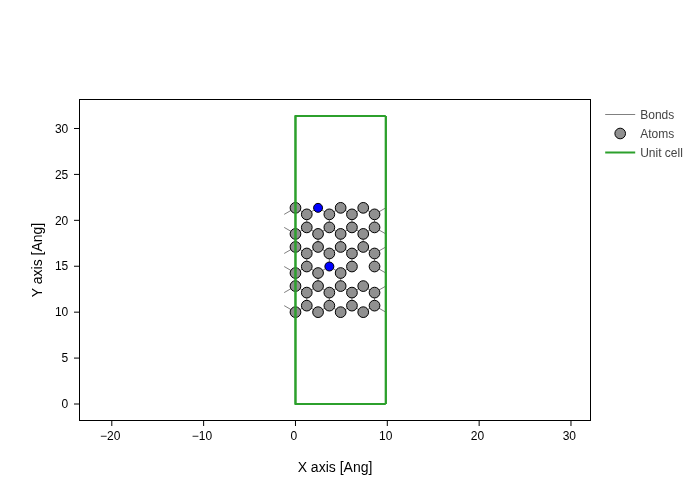
Methods that take atomic indices also take a category. Here we extract the nitrogen atoms, and we highlight them in a plot.
[5]:
print(ribbon.sub(nitrogen))
Geometry{na: 2, no: 2,
 Atoms{species: 2,
  Atom{C, Z: 6, mass(au): 12.01070, maxR: 1.43420,
   Orbital{R: 1.43420, q0: 0.0}
  }: 0,
  Atom{N, Z: 7, mass(au): 14.00670, maxR: 1.43420,
   Orbital{R: 1.43420, q0: 0.0}
  }: 2,
 },
 maxR: 1.43420,
 Lattice{nsc: [3 1 1],
  origin=[0.0000, 0.0000, 0.0000],
  A=[9.8380, 0.0000, 0.0000],
  B=[0.0000, 31.3600, 0.0000],
  C=[0.0000, 0.0000, 20.0000],
  bc=[Periodic,
      Unknown,
      Unknown]
 }
}
[6]:
ribbon.plot(axes="xy", atoms_style=[{"atoms": nitrogen, "color": "blue"}])
/opt/hostedtoolcache/Python/3.14.8/x64/lib/python3.14/site-packages/sisl/viz/processors/xarray.py:208: FutureWarning: Deleting a single level of a MultiIndex is deprecated. Previously, this deleted all levels of a MultiIndex. Please also drop the following variables: {'sc_atom'} to avoid an error in the future.
  new[var] = new[var] * scale
/opt/hostedtoolcache/Python/3.14.8/x64/lib/python3.14/site-packages/plotly/io/_kaleido.py:185: UserWarning: The kopts argument is ignored if using a server.
  img_bytes = kaleido.calc_fig_sync(
3. Combine categories
Categories combine with the operators of Python sets:
Operator |
Meaning |
|---|---|
|
in |
|
in |
|
in exactly one of |
|
not in |
For example, all atoms that are not carbon, or the carbon atoms only:
[7]:
carbon = AtomZ("C")
print("not carbon:", np.flatnonzero((~carbon).mask(ribbon)))
print("carbon count:", carbon.mask(ribbon).sum(), "of", ribbon.na)
not carbon: [17 20]
carbon count: 45 of 47
4. The atomic environment
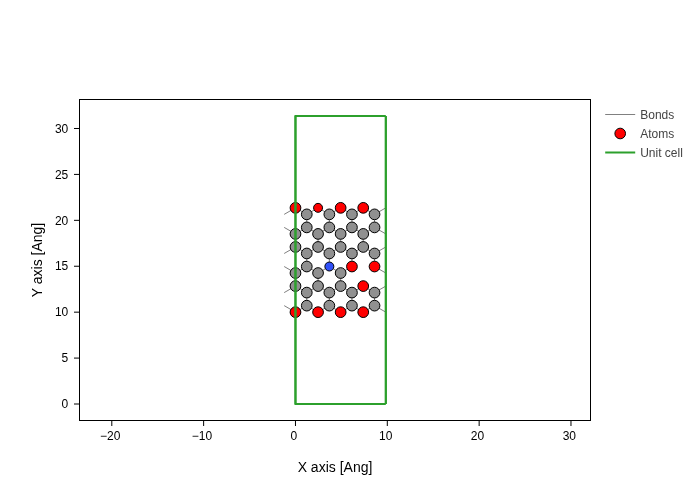
AtomNeighbors counts the neighbors of each atom within a radius R (in Ångström). Atoms in the bulk of graphene have 3 neighbors. The atoms at the edges, and the atoms around the vacancy, have only 2.
[8]:
two_bonds = AtomNeighbors(max=2, R=1.5)
print(np.flatnonzero(two_bonds.mask(ribbon)))
[ 0 5 12 17 24 29 32 36 37 40 43]
[9]:
ribbon.plot(axes="xy", atoms_style=[{"atoms": two_bonds, "color": "red"}])
/opt/hostedtoolcache/Python/3.14.8/x64/lib/python3.14/site-packages/sisl/viz/processors/xarray.py:208: FutureWarning: Deleting a single level of a MultiIndex is deprecated. Previously, this deleted all levels of a MultiIndex. Please also drop the following variables: {'sc_atom'} to avoid an error in the future.
  new[var] = new[var] * scale
/opt/hostedtoolcache/Python/3.14.8/x64/lib/python3.14/site-packages/plotly/io/_kaleido.py:185: UserWarning: The kopts argument is ignored if using a server.
  img_bytes = kaleido.calc_fig_sync(
AtomNeighbors takes one or two numbers: AtomNeighbors(3) means exactly 3 neighbors, AtomNeighbors(1, 2) means 1 or 2 neighbors. The keywords min and max give only one bound.
The argument neighbor counts only the neighbors in another category. These are the atoms with at least one nitrogen neighbor:
[10]:
next_to_N = AtomNeighbors(min=1, neighbor=nitrogen, R=1.5)
print(np.flatnonzero(next_to_N.mask(ribbon)))
[11 14 21 23 26]
5. The position of atoms
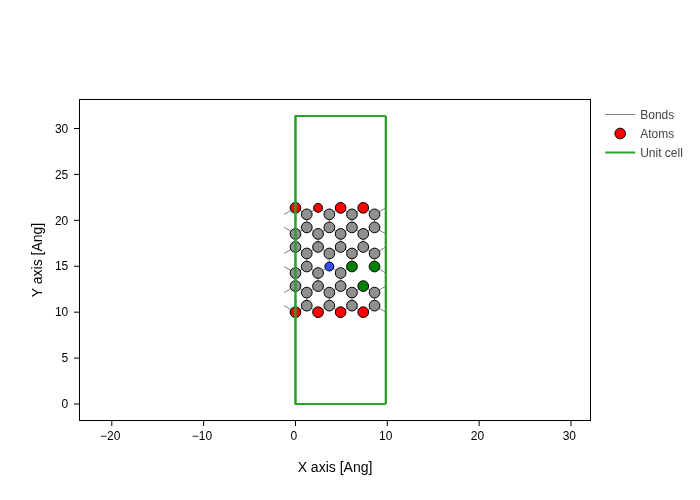
AtomXYZ selects atoms by their coordinates. A tuple (min, max) gives an interval, and None means no bound. The atoms near the vacancy are not at the edges, so a position interval separates them from the edge atoms:
[11]:
y = ribbon.xyz[:, 1]
inside = AtomXYZ(y=(y.min() + 1, y.max() - 1))
vacancy = two_bonds & inside
print(np.flatnonzero(vacancy.mask(ribbon)))
[32 37 43]
AtomXYZ also has a short form with < and >, also for fractional coordinates (fx, fy, fz):
[12]:
lower_half = AtomXYZ.fy < 0.5
print(lower_half.mask(ribbon).sum(), "atoms in the lower half of the cell")
23 atoms in the lower half of the cell
[13]:
ribbon.plot(
    axes="xy",
    atoms_style=[
        {"atoms": two_bonds & ~inside, "color": "red"},
        {"atoms": vacancy, "color": "green"},
    ],
)
/opt/hostedtoolcache/Python/3.14.8/x64/lib/python3.14/site-packages/sisl/viz/processors/xarray.py:208: FutureWarning: Deleting a single level of a MultiIndex is deprecated. Previously, this deleted all levels of a MultiIndex. Please also drop the following variables: {'sc_atom'} to avoid an error in the future.
  new[var] = new[var] * scale
/opt/hostedtoolcache/Python/3.14.8/x64/lib/python3.14/site-packages/plotly/io/_kaleido.py:185: UserWarning: The kopts argument is ignored if using a server.
  img_bytes = kaleido.calc_fig_sync(
6. The keyword form
AtomCategory builds categories from keywords. Each keyword is the name of a category without Atom, and many keywords combine with &. A dict with the same keywords works directly as an index.
[14]:
edge_carbon = AtomCategory(Z="C", neighbors={"max": 2, "R": 1.5})
print(edge_carbon)
print(np.flatnonzero(edge_carbon.mask(ribbon)))
print(ribbon.sub({"Z": "N"}).na, "nitrogen atoms")
Z={6} & neighbors ∈ [0;2]
[ 0  5 12 24 29 32 36 37 40 43]
2 nitrogen atoms
An unknown keyword shows the valid keywords:
[15]:
try:
    AtomCategory(neigbors=2)
except ValueError as e:
    print(e)
AtomCategory.kw got an unknown keyword 'neigbors'. Did you mean: neighbours, Neighbors?
    Valid keywords are: Even, FracSite, Index, Neighbors, Odd, Seq, Tag, XYZ, Z, ax, ay, az, element, fx, fy, fz, neighbours, species, x, y, z.
7. Change a geometry with categories
A category describes which atoms to change. The method describes how. Here we move the atoms next to nitrogen out of the plane:
[16]:
buckled = ribbon.translate([0, 0, 0.3], atoms=next_to_N)
print(np.unique(buckled.xyz[:, 2] - ribbon.xyz[:, 2]))
[0. 0.3]
sisl.geom.saturate adds atoms to the missing bonds. Each rule is a pair of a category and a Saturate object, and the first rule that selects an atom wins. Here the edge carbon atoms get hydrogen, and the edge nitrogen atom gets nothing because it already has a lone pair:
[17]:
from sisl.geom import Saturate, saturate

edge = two_bonds & ~inside
passivated = saturate(
    ribbon,
    [
        (edge & nitrogen, Saturate("H", coordination=2, R=1.5)),
        (edge, Saturate("H", bond=1.09, R=1.5)),
    ],
)
print(passivated.na - ribbon.na, "hydrogen atoms added")
7 hydrogen atoms added
[18]:
passivated.plot(axes="xy")
/opt/hostedtoolcache/Python/3.14.8/x64/lib/python3.14/site-packages/sisl/viz/processors/xarray.py:208: FutureWarning: Deleting a single level of a MultiIndex is deprecated. Previously, this deleted all levels of a MultiIndex. Please also drop the following variables: {'sc_atom'} to avoid an error in the future.
  new[var] = new[var] * scale
/opt/hostedtoolcache/Python/3.14.8/x64/lib/python3.14/site-packages/plotly/io/_kaleido.py:185: UserWarning: The kopts argument is ignored if using a server.
  img_bytes = kaleido.calc_fig_sync(
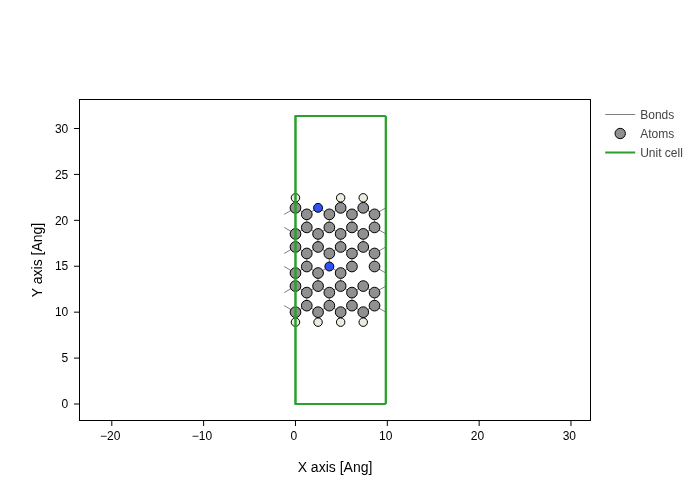
Saturate finds the number of missing bonds from the most frequent number of bonds of the same element, here 3 for carbon. The argument coordination sets it directly: coordination=2 for the nitrogen means that it is already saturated. Without bond, the bond length is the sum of the atomic radii, which is approximate.
Summary
A category selects atoms by element, position or environment, and it does not depend on the indices.
maskreturns one boolean per atom. Methods that take atoms also take a category or adict.Combine categories with
&,|,^and~.AtomCategory(...)and plaindicts build categories from keywords.
The reference of all categories is in the API documentation: Indexing atoms.